
Wayne's Performer's Group Forum!
Welcome to my corner!
And welcome to . . . Sequencing 101: Phase 1
This tutorial will be a bit longer than the others because part of it is learning
Later we'll cover . . .
Download this MIDI. It's a very simple I IV V (145) 12 bar R&R song. We'll all work on
Click to go back to the main Tutorials and Workshops Directory
Please help keep us online with a small donation!
Hands-On lesson: Changing tempo and key (PC or Mac)
Editors used:
Anvil Studio, PowerTracks Pro Audio, Acoustica Mixcraft, Mac GarageBand
some basic things that will apply to all the others. So don't let the text bother
you. Once you get through one of these, there's a bunch of stuff I just won't
need to go over again. SO . . . be sure to go through these in order!
How to add additional tracks (And how to remove tracks)
How to change length (add verses, add solos, delete solos, etc.)
About Markers, Editing BLOCKS
Importing files into your existing files (Using tracks from other MIDI files in your MIDIs)
Once you can do these edits, you're not far from creating a MIDI from scratch!
To start this off, you will use the MIDI I have linked right here. So we can stay on
the same page, and do the same edits, and get the same results! All questions,
comments and answers will be about the same file. So we all can follow along.
Set up a folder and download this file now: JBG_F_152bpm.MID
JBG_F_152bpm.MID
the same song together. If you don't understand what a 145 is, you're going to have
problems editing MIDIs because you need at least some very basic theory understanding
to figure out what you want to do with the MIDIs you want to edit.
If you're totally in the dark when it comes to understanding music theory, I strongly
recommend you read my Theory 101 article. Download it here.
https://thewaynereedconnection.com/techlinks/tech_links.html Scroll to the bottom of the page and
select the format you want. It's a concise theory overview, 11 pages with lots of pix!
Did you make a folder for this project?
Lesson 1: Open your MIDI editing software. Open the MIDI file. RE-SAVE this MIDI
file, naming it JBG_F_152bpm_ EDIT_0.mid so you now have TWO MIDI files.
During the sequencing you would normally 'save' a BUNCH of times.
A dozen or more. And each time you save, give it a NEW name so you know
where you're at. What's been done. Each major change, SAVE. So we
started off with a MIDI named JBG_F_152bpm.mid. We opened the MIDI,
while keeping the original UNTOUCHED! And renamed our project MIDI
so we know the name, tempo (bpm) and key it's in, and the Edit number.
JBG is in the key of F, plays at 152 Beats Per Minute, and has zero edits.
We now have TWO MIDI files, correct? The original, untouched MIDI. And
an identical copy with a new name, and adding Edit_0. No changes yet.
NOTE: Never edit your original MIDI! Always save it with a new name. So your
original MIDI will not ever be edited! EVER! You can just rename your original
something like Summertime_Original_Version.MID So if you have to, you can
always revert back to your original.
NOTE: This applies to ANYTHING you edit! Text, tracks, documents, whatever you're
going to edit, open it, re-save it under a new name. Then edit away. Or rename the
original with a suffix or prefix. (IE: Add 'original' before or after the name.)
As we edit and change the MIDI, so will the MIDI name change. When
we're done, we'll name our final MIDI something short and sweet. Or
not so short. Depends on how you like your titles.
Examples: JBG Original - JBG Drums 1 ~ JBG Bass 1, JBG add 1 solo verse 1, etc.
So this is our first MIDI file for JBG. We’ll end up with around a dozen before we're done.
What I do . . . I keep all files. Inside the main folder for the song I'm working on,
I have a Dev folder. (development) I name it 'Dev' with the date. EX: Dev 12_4_22
If I edit the file at a later date, I open the one I want to edit. SAVE it as a new name.
And set up a new Dev folder with the new date.
Keep in mind, I render my MIDI tracks to .wav and each track within the MIDI becomes
a .wav file. I usually end up with a couple dozen files once the song (backing track) is
finished. And I keep them all.
Let's organize our editing. You'll probably edit more than one change per
name change once you get a handle on basic editing. For now, through this
project, we'll do only 1 edit at a time, then SAVE!
Let's get organized . . . What this file needs . . .
Planning out future tutorial topics.
JBG_F_ 152bpm
This isn't a bad sounding track. But as a backing track for performance . . .
Not so good! Let's change that.
NOTE: Some MIDI files sound OK through your PC. To listen to. But to get
some ZING into your backing tracks, a couple things to do . . . Vary the volume
and velocity throughout the length of the track. Build up a little here and there.
Back the volume down a little bit for dynamics. And DON’T BE PEFECT! The last
thing you want is to make your MIDI perfect. Never, ever quantize! Regardless
of the one MIDI rule that says . . . ALWAYS quantize. If you want your tracks
to sound like they are being played by robots, fine. Quantizing removes ALL
human feel. No band ever plays any song perfectly.
About the only thing correct in this MIDI is the melody. And we don't even
NEED the melody in there. The drum track needs work. The bass guitar
pattern is wrong, whatever style you're going for. Intro's too short. So the
track is an absolute loser. Right?
I don't think so! All the hard work's been done for you. With some tweaks
and editing this can be a great track!
But we have some work to do.
Track organization is horrendous. Some track names are incorrect. The flow
of channel assignments is all over the map. The only EVENTS in each track are
for Master Volume and Gain. There's an extra blank track: sloppy. Or move it
up to the top. Synth brass for BU VOX? Seriousy? Distortion guitar lead VOX?
Do we want the melody in there? Harpsichord for main piano ? Who uses a
harpsichord for Rock~n~ Roll!?!
Original or rockin'? What version do you want to do?
Upright bass vs finger bass
Original bass pattern or rockin' bass walk?
Tempo is a bit quick for original version. Too slow for a rocker.
Key: guitar key vs horn or keyboard key
Are there enough (or too many) solo choruses?
INTRO: needs measures corrected to match original intro. Needs breaks (tacit)
OUTRO: Tag? Double Tag? Or no tag? Count Basie end? Or ?
I generally hate fade out endings for backing tracks! Who does
a fade out on stage! Pretty rare.
However, I do a lot of segues. One song into the next. So somemes
I do a bit of a fade out on one song, then a bit of a fade in on another song.
Then I merge the tracks together and cross fade them. That's pretty cool.
WOW! Where do we start? Doesn't matter a whole bunch what
you decide to edit first. But I personally like to do a few things at
the beginning. I pretty much approach all edits the same way. I'm
really systematic about it. You can find your way. What works for you.
I like to get the tempo correct. Decide on the key. And then organize my
tracks. Choose the instruments I want. Rename the tracks appropriately.
And get each track's channel assigned in an organized system. It doesn't
necessarily affect your MIDI if the tracks are named incorrectly, and if your
channel assignments aren't done in an orderly fashion. But if you get used
to getting them straight, organized, it'll save you a lot of grief when you start
changing instruments or editing a track and everything is named correctly.
And you know what channel you’re editing.
SIDEBAR: Each track is assigned a channel. You edit the channel, not the track.
So if you get the channels mixed up, and you edit something in say, track 1 that's
assigned to channel 3, then later edit something in track 10 that's also set to
channel 3, you'll be changing track 1 as well. Because you edited the channel.
EXAMPLE: Track 1, assigned to channel 3: Pan the notes/chords played to the left.
Track 10, also assigned to channel 3. Pan the notes/chords played to the right. You
also just changed the panning of track 1 to play on the right. Because you said . . .
channel 3, pan right. Higher tracks supersede, or have precedence over lower tracks.
So saying channel 3 is panned right in track 10 over-writes what you said in track 1.
END SIDEBAR
SO let's make our first edits!
Let's change the tempo, then the key. Both require some fore thought. How do you
want to perform this song? Like the original? Upright Bass, slower tempo. With a
specific bass pattern. Not at all like the more modern, driving boogie bass we're
used to hearing. Or do you want to kick it up some? Make it a ROCKER!
Both are acceptable. Maybe you want one for each style, depending on the gig.
Let's go with “Rocker” and a more modern, driving bass line. Later you can go back
and make a MIDI closer to the original.
So we know we need to swing the bass line some. And we also know we need to pick
up the tempo a little. It's at 152bpm right now. That's gonna be about right for the
original version. Let's kick it up to about 166bpm. Once we edit the bass line we can
tweak the tempo if needed.
So here we go. We'll edit the tempo to 166, then save the file as . . .
JBG_F_166bpm_EDIT_1.mid
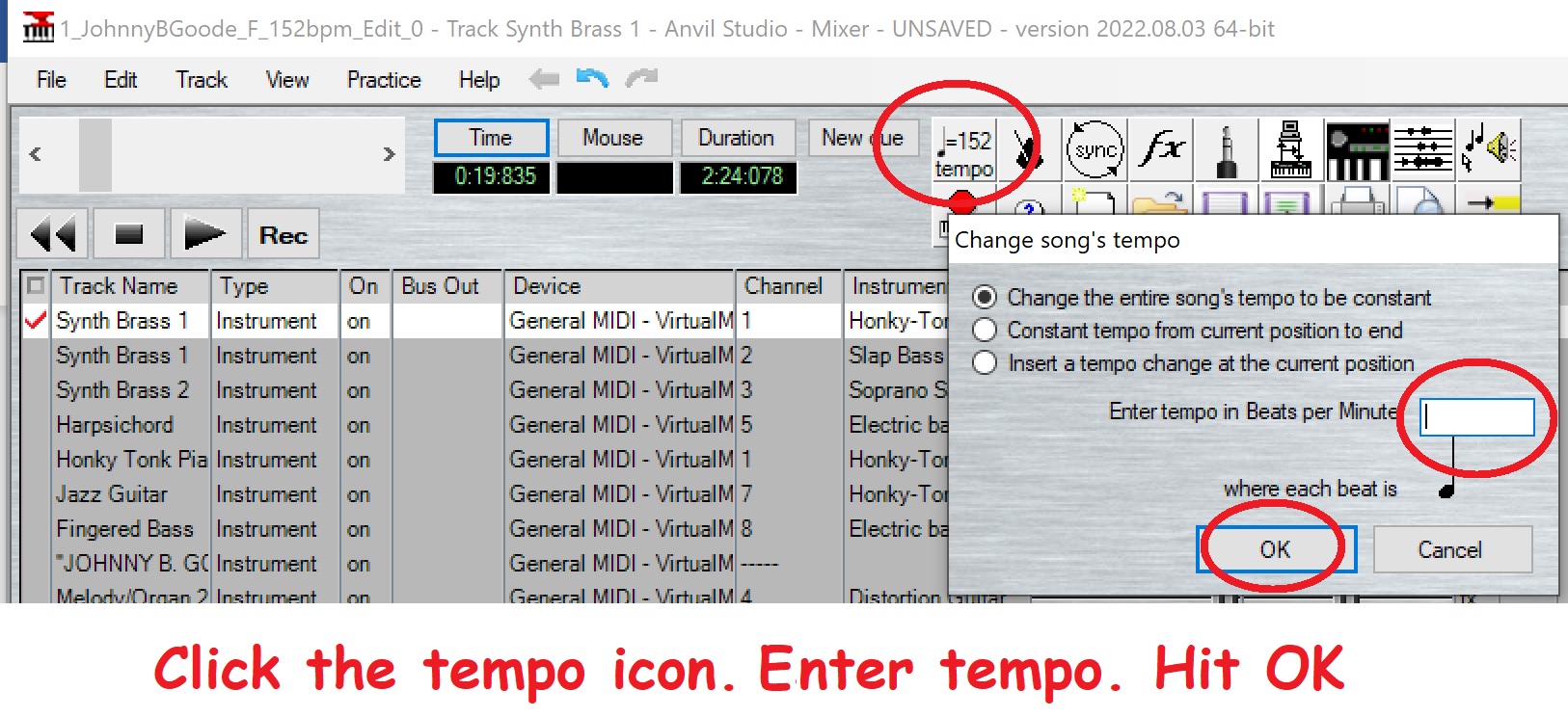
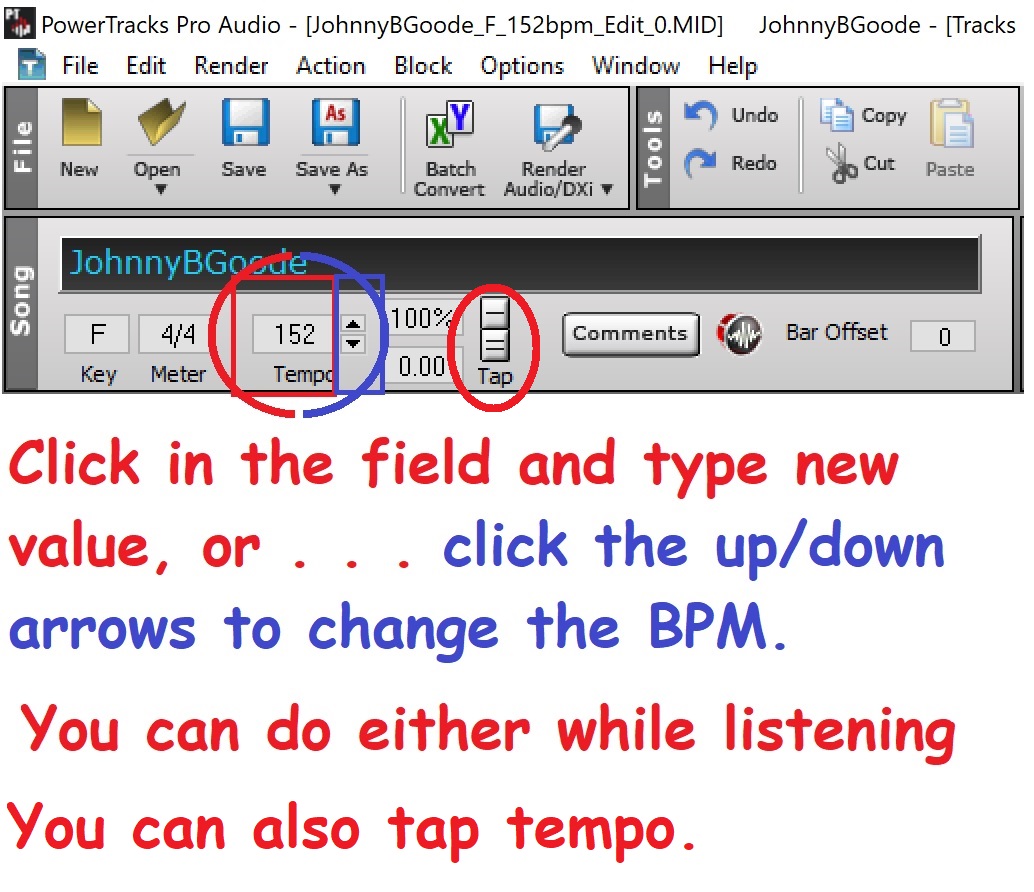
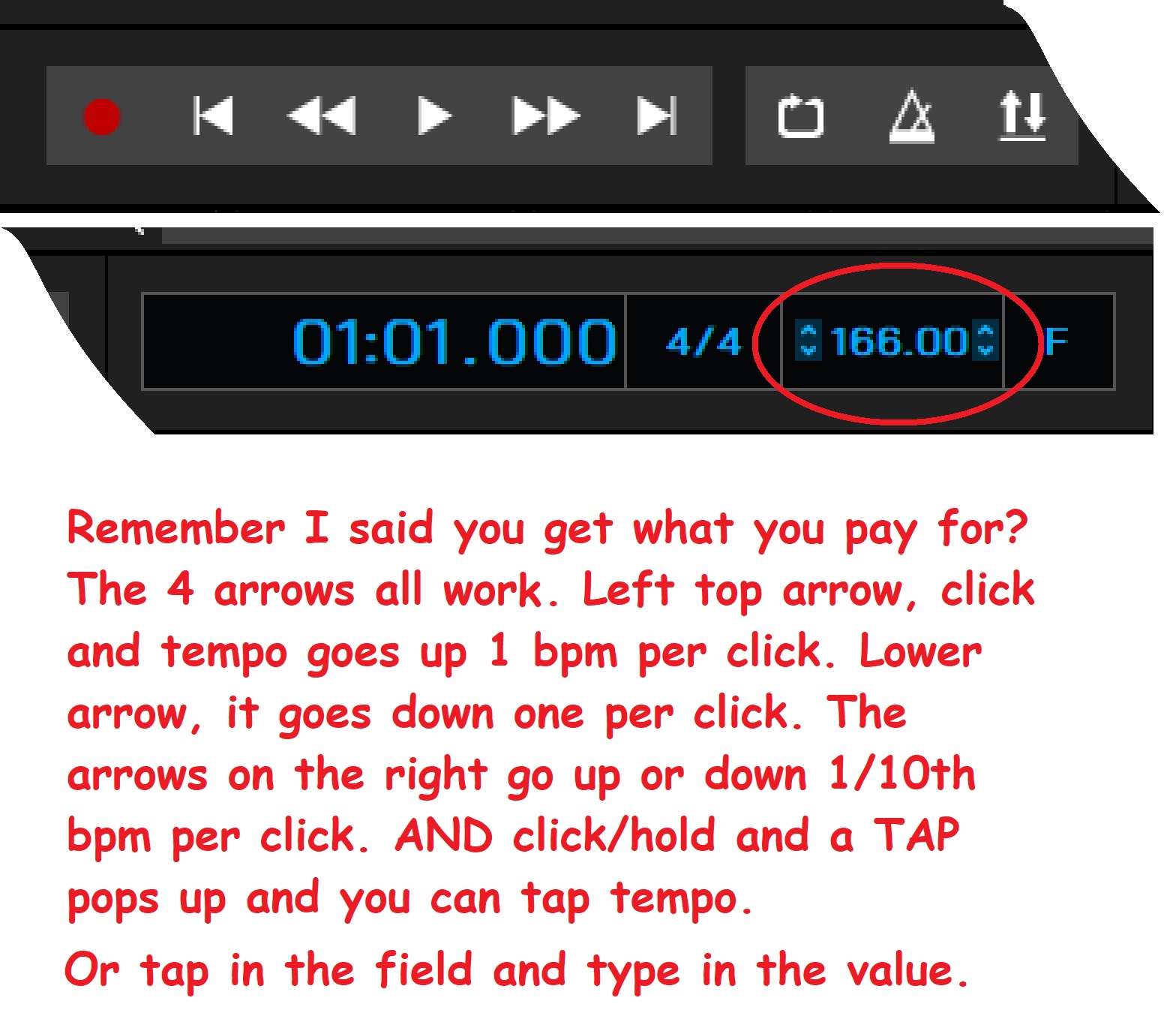
So how do we actually edit the tempo? We look for an icon or a field we can
edit named Tempo or BPM (beats per minute). Usually a field. Edit it just like you
edit any other field in any other software. Click in the field. Type in the new value.
In this case, 166. Or you might click on the “bpm” icon and might get a drop down
menu. Do what you always do in any other software when you get a drop down menu.
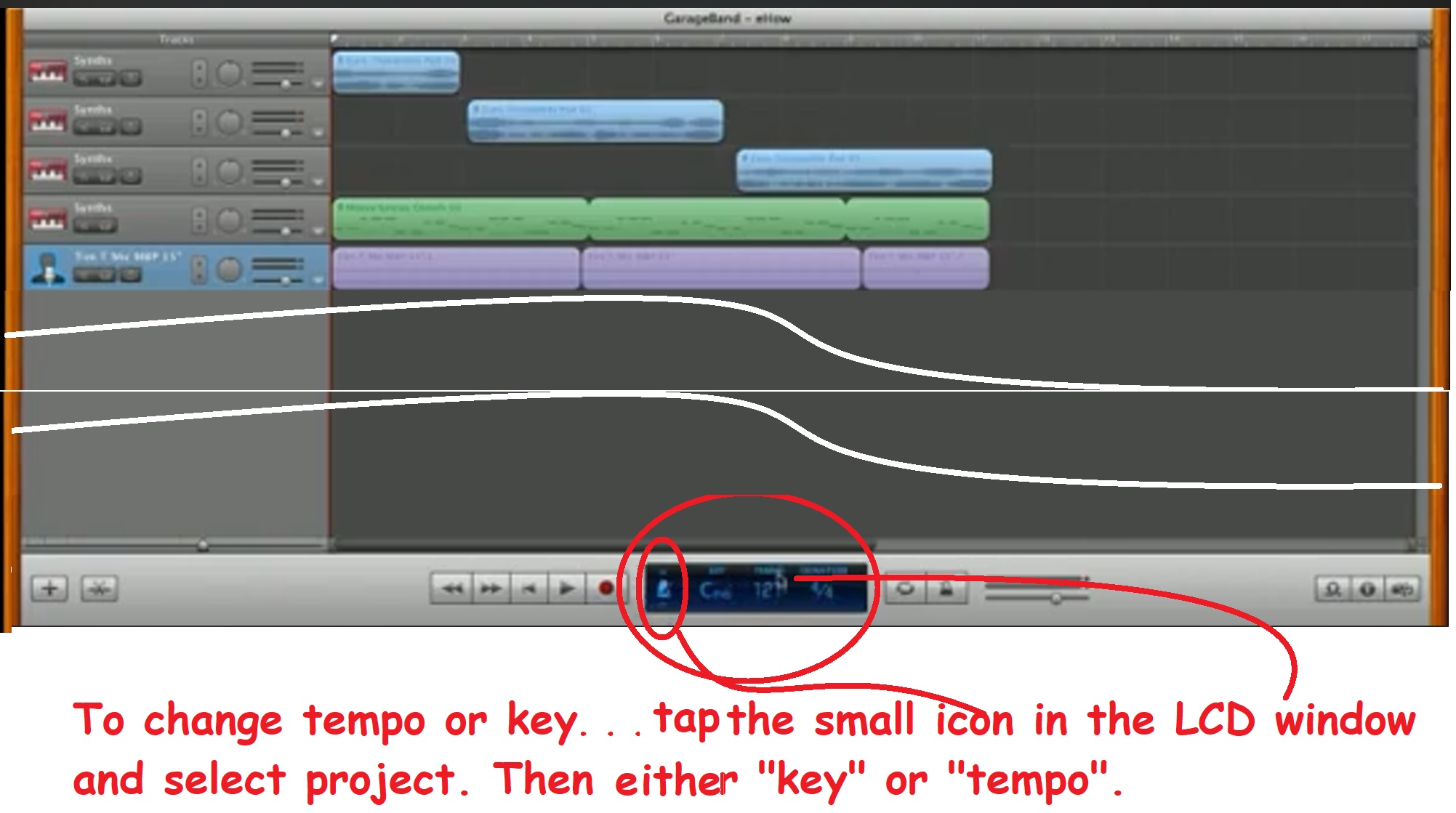
Here are some examples . . .
Anvil Studio
Powertracks Pro Audio
Acoustica Mixcraft
Mac GarageBand
And that's it! DONE. Now re-save your file to JBG_F_166bpm_EDIT_1.mid
Now we'll edit the key. Again, fore thought. Who's playing the lead/solos? Do you
want this to be a guitar based rocker? Or are you a saxman, and want to play the solo
on sax? Umm, tenor or alto? Or are you a keys player, want to play the solo on piano.
And need to keep it in a simple key because you're not yet a great soloist.
Another thought concerning the key you want this in. Be sure you don't have too
many songs in the same key! If you do say, 3 or 4 other 50s/60s R&R tunes, all in A,
you should consider doing a couple of them in other keys. Like one in B. Maybe one in G.
So decide on the key. F is not so good for a guitar player. The solo does not lay well
over that key. Probably why the original isn't in F! Maybe this MIDI was made by a
horn player. And he/she likes playing in F, Bb and Eb. Or maybe you want to change
the key to C or G, or . . . leave it in F for keys solos. C, no sharps or flats. G, only one
sharp. F, only one flat. Not bad for keys solos.
I don’t know what you're gonna play the solo on, so I’m gonna pick Bb. You pick
whatever you like. A is great for guitar. Also consider (Um, maybe even consider
this first!) the singer! Be sure you edit the key within their vocal range.
Let's change the key now!
We'll start with Anvil Studio. OK, you can change the key of individual tracks, or
the entire song, all tracks if you want with any editor. But you don't want to change
the key of the drum tracks. EVER! Trust me on this. So when you select the tracks to
change, be sure not to select the drum track if you're going to change all. OR, in
Anvil you have anther option. You can simply change the track type from 'instrument'
to 'rhythm'. Anvil will ignore rhythm tracks when it changes the key. So it’s an extra
step. But EZPZ!
You can start by reading the HELP section for key transposition. Then move on to
making the actual edit. I recommend you read the HELP, then move on here. But
we ARE going to do this step by step below! Reading HELP just makes you smarter! LOL
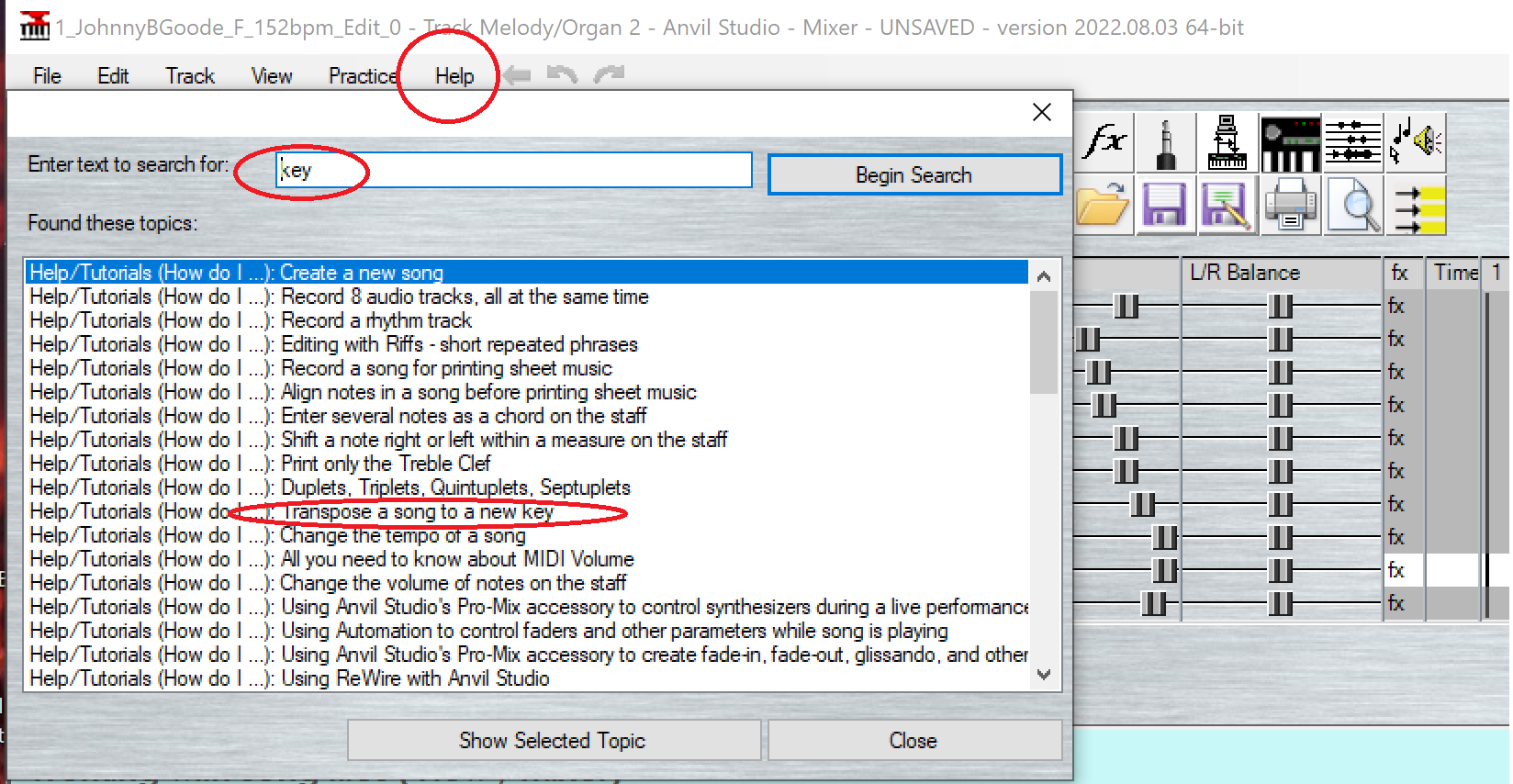
You need to understand half steps and the Chromatic scale to do key changes.
You don't necessarily change a MIDI from on key to another. What you do is
change all the notes played up or down a specified amount. So, this song is in
F. We want to go to Bb. So I know I need to change ALL of the notes in the song
UP 5 half steps, or simi-tones. Or . . . move them all DOWN 7 half steps.
Again, check out the Theory 101 article if this is new to you.
So let's transpose this bad boy! Change the drum track to “rhythm”
as it shows in the HELP instructions. Just click the word 'instrument' on the
drum track. Select 'Rhythm'.
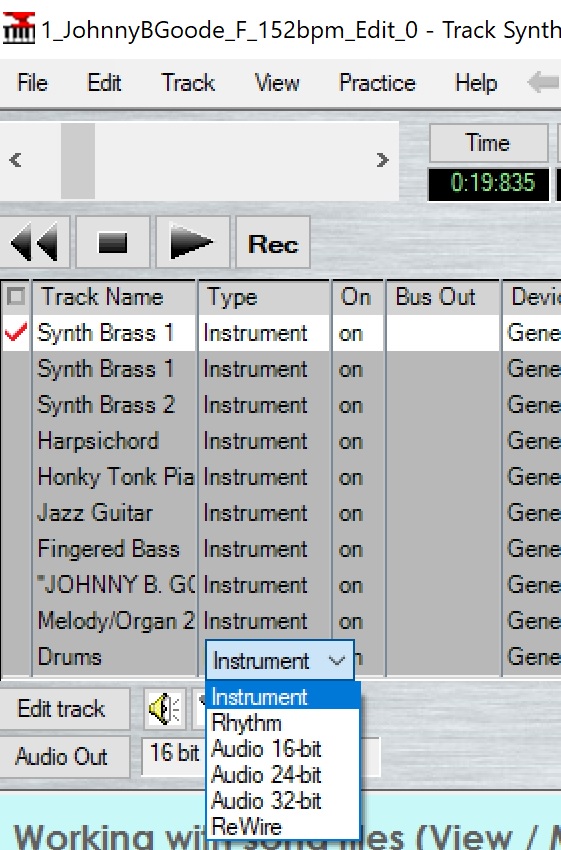
Now you can change the key for the whole song in a couple clicks instead of
doing 1 track at a time. Just click on 'Track', 'Transpose' and 'All tracks of Song'.
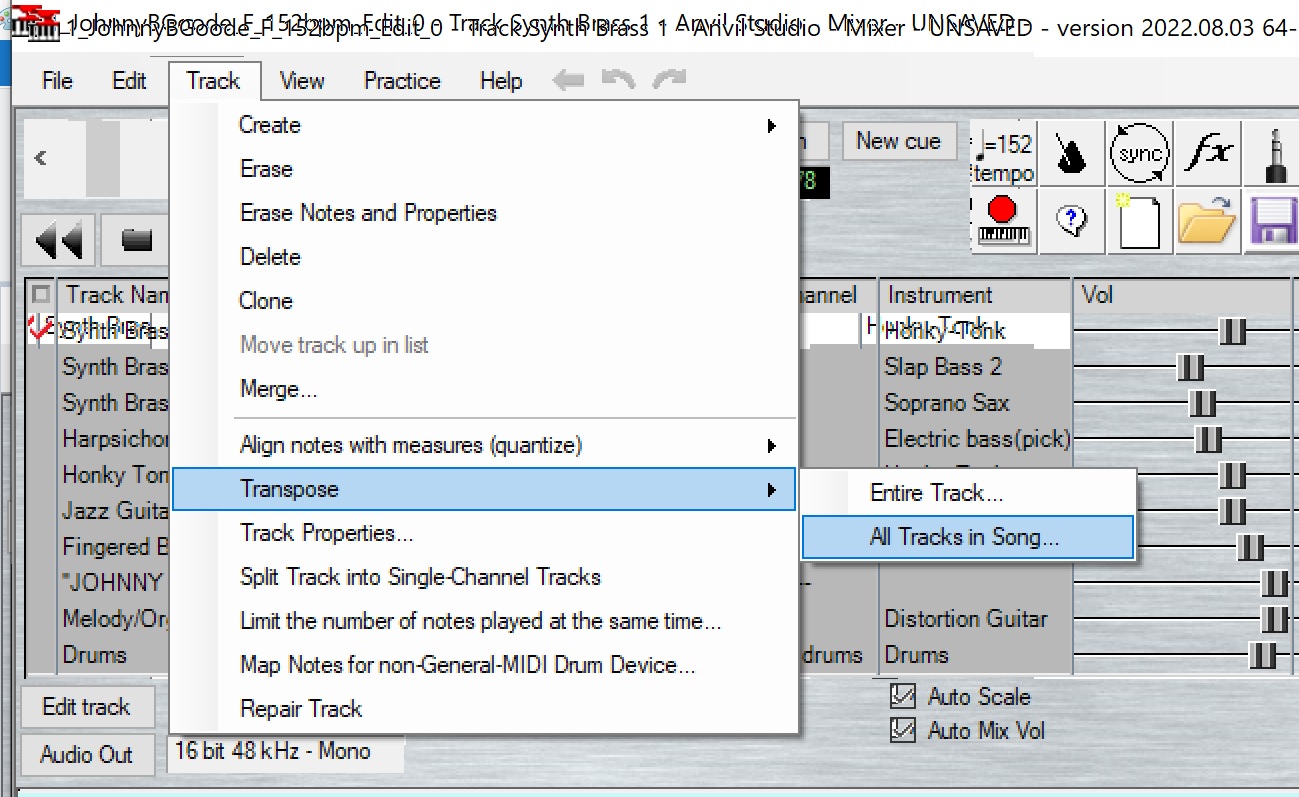
As above, now we save our file. This time to
JBG_Bb_166bpm_EDIT_2.mid
OK there ya go. We now have the song up to tempo and in the
key we want. Now, while we’re editing the song, every time
we play it, it's sinking in! We can sing along. Or mentally run
through the solo while we listen to it because it's up to tempo,
and up to the correct key.
NOTE: One thing I need to mention. It makes a huge difference if
you go UP to key, or DOWN to key. You will almost always need
to edit some instruments after a key change. 1 or 2 half steps?
Maybe not. But more than a couple, then probably. Why?
Because some of the instruments are now out of their normal
range. The song was in F. If you went down 7 half steps for
example, the bass guitar will be WAY too low. Or if you changed
it up 5 half steps, the piano is most likely going to be too high.
Back Up Vox might be too high or too low. You could be working
on a song like Can’t You See by Marshall Tucker. That song is in
G (D Mixolydian). If you change the song’s key say, up to C, you won’t
even hear the flute. It’ll be way out of range. So you’ll need to drop
the flute an octave.
OK. How about PowerTracks? Couple options. I always have all drum
tracks at the bottom. One reason, it’s easier to do key changes.
Basically, I highlight all of the tracks except the drum tracks, then
simply Pitch Transpose x number of half steps just like in Anvil. So
you open PowerTracks, and make a couple clicks. BINGO!
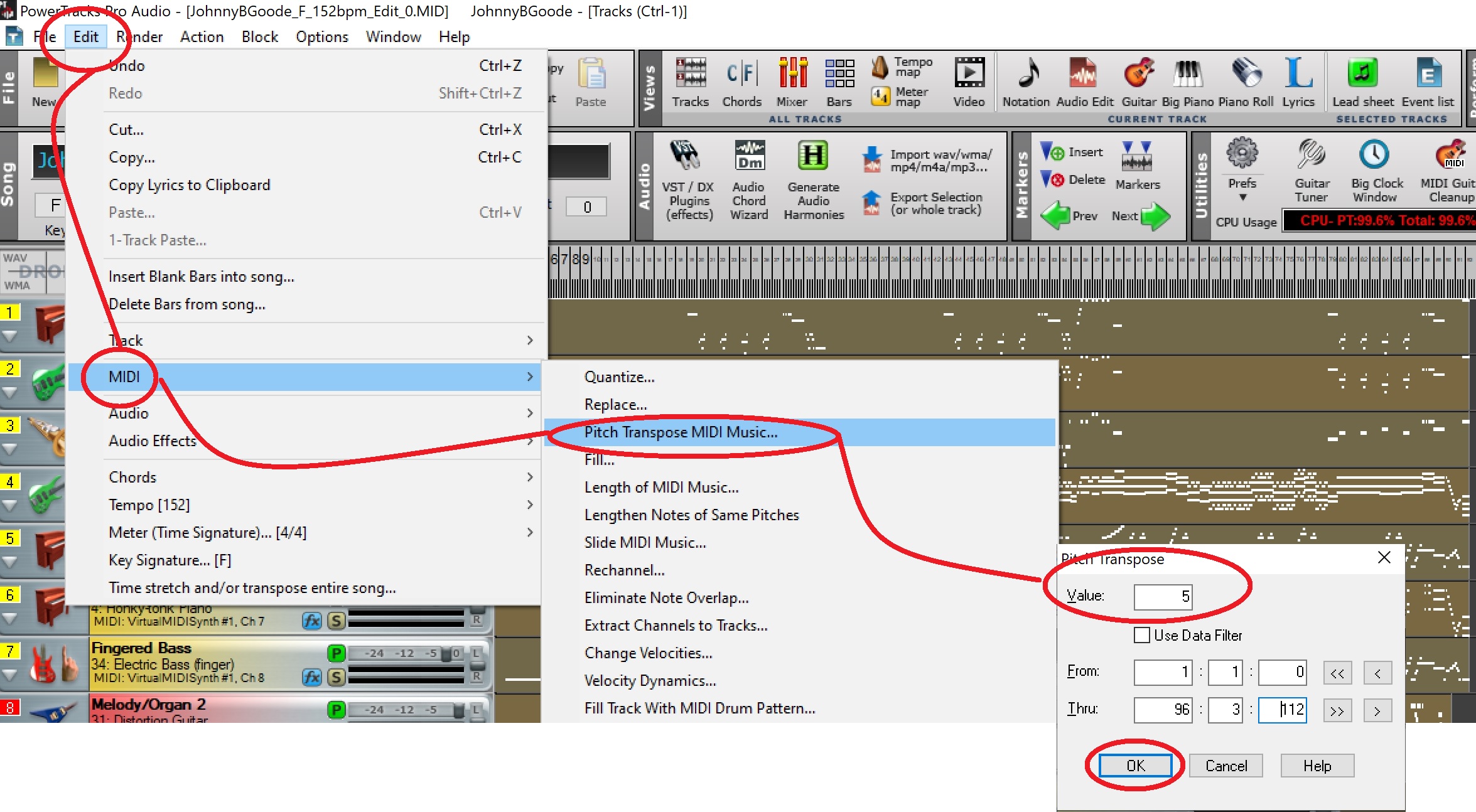
Even easier in Mixcraft. Just highlight what you want to change,
right click. Select MIDI, then select Transpose. Fill in the field.
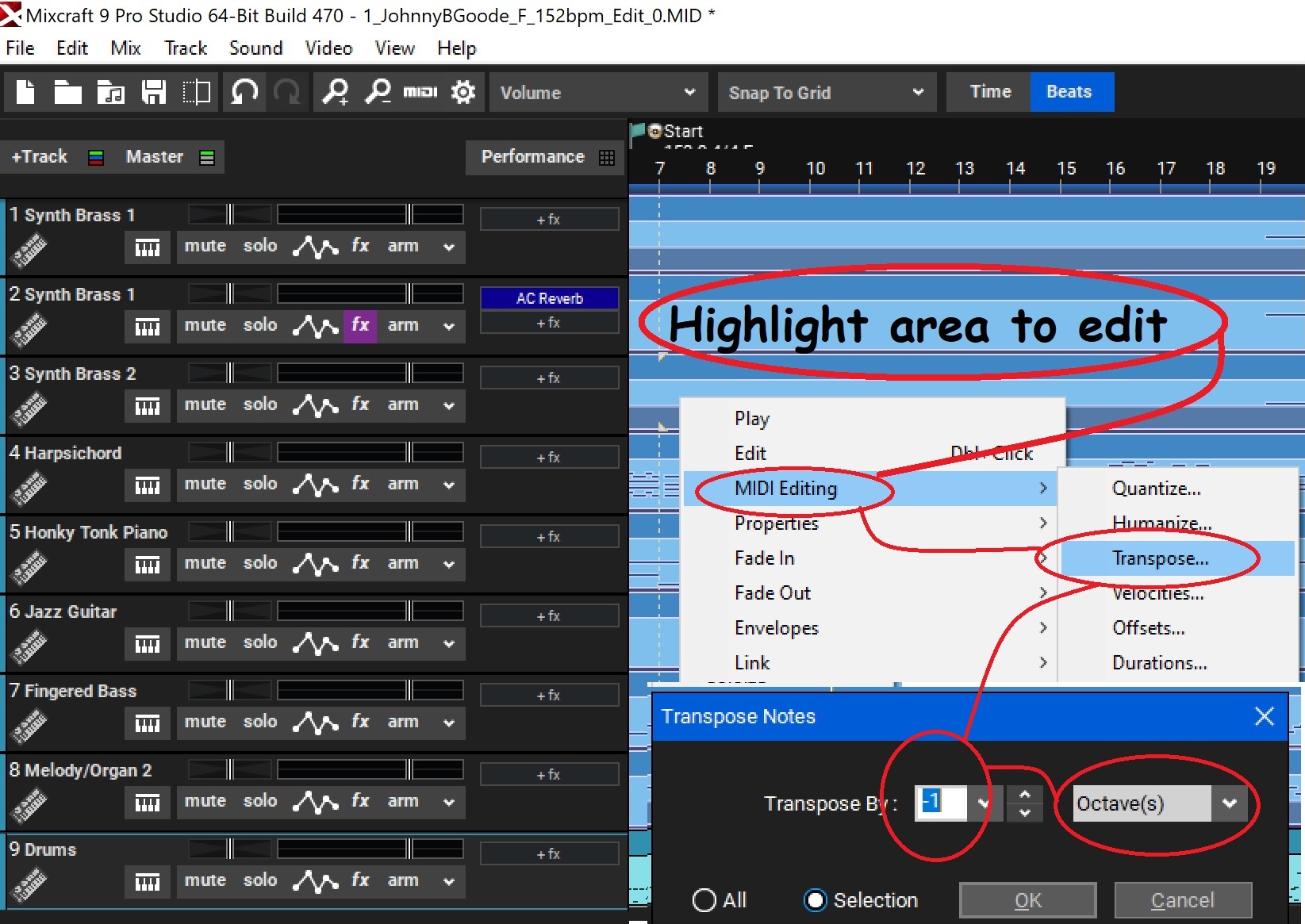
And of course, save our edited file again . . .
JBG_Bb_166bpm_EDIT_2.mid
Now let's check out GarageBand. This one is a little more work. Not
much. A couple more steps maybe. But not difficult.
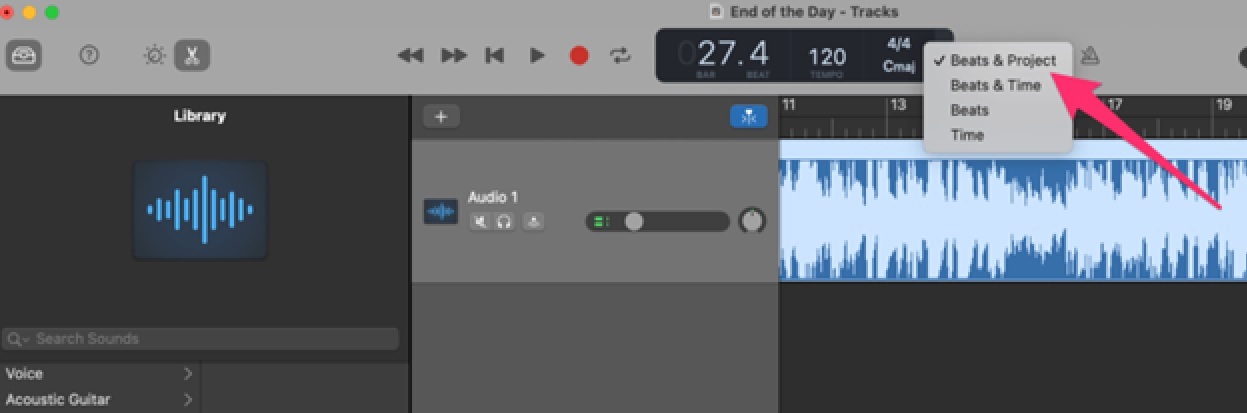
Click on the arrow on the right-hand side of the LCD.
Select Beats & Project from the menu.
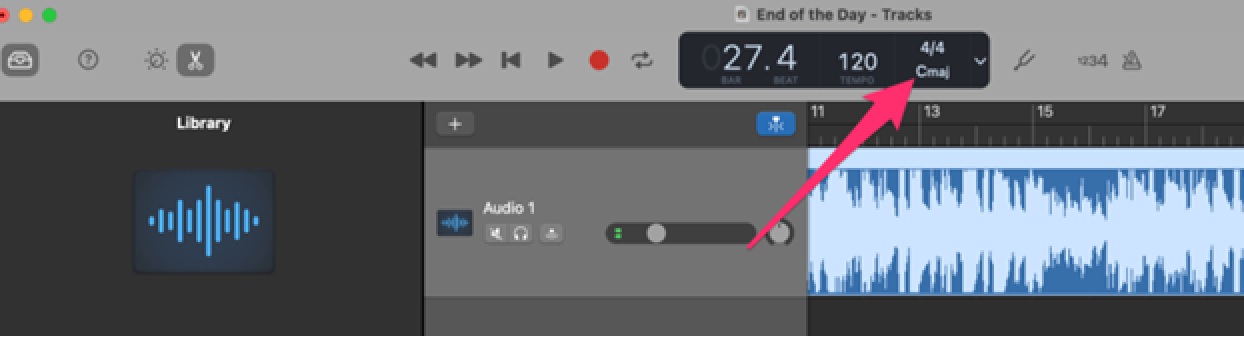
You'll see the Time Signature and Key icons displayed
on the LCD. Click on this to access the changes.
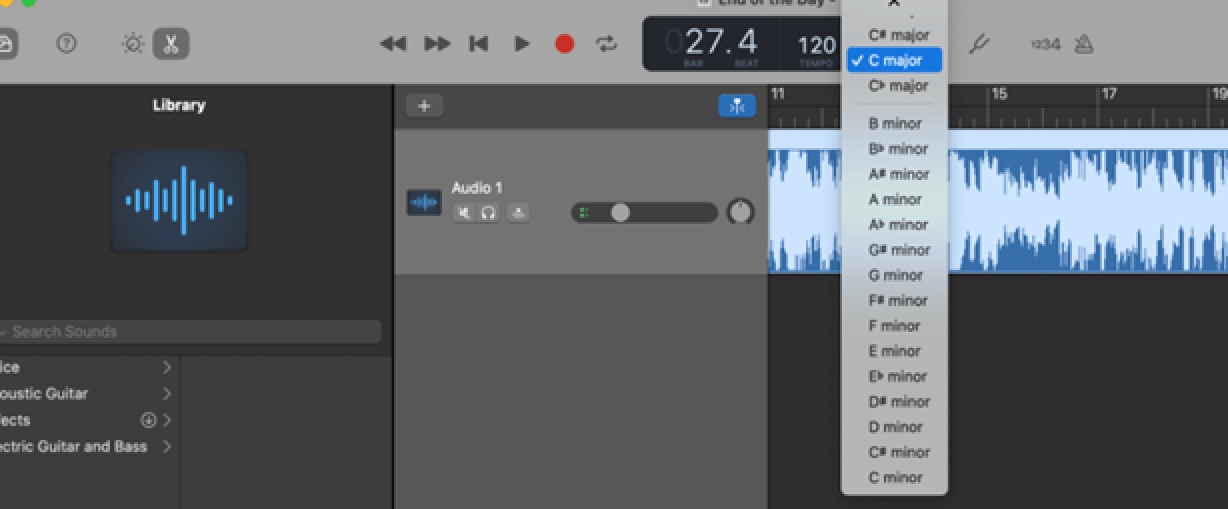
Once you click on the Key, another menu will pop up
displaying all of the keys. Choose the key you want
to change the song to from this list.
OK, that's what I'll call Phase 1. The next thing I always do is get
the tracks organized. You might prefer to do this first. I just like
getting the tempo and key done first. Call it a quirk. But I like
the idea that any time I'm listening to the track during edits, I'm
hearing it the way I want it. Tempo and key being correct.
So take a break. When you come back we're going to get this MIDI
track organized!
See you in Phase 2!
Phase 2
Click here to continue on your journey to becoming a better sequencer!
Tutorials and Workshops Directory
Wayne (Reed) Knazek ~ Email Me Here! ~ My personal Web site

Join my Support Group Forum
This site is free for all. The tutorials, workshops. 43,813 MIDI, KAR &
BIAB backing tracks files, 23 BIAB User Styles. A FREE SoundFont,
Timbres of Heaven. Free MIDI players and editor!
The fees for a site this large (260+ pages with over 50K files)
is pretty high, as you can imagine.
Please consider making a small donation to help keep us online. It
would help so much! Thanks! Wayne
PS: I pay for the site and all hosting, security and domain related
expenses out of pocket. Donations appreciated. Please click the link below.